
TSA Tracker: the agreement becomes the exit plan
AtlanticM&A6 min read
TSA Tracker is the AtlanticM&A module for running transition service agreements after a deal. It reads the TSA addendum, turns every service into a row with its own exit clock, and estimates which exits depend on which. It sits in the same workspace as the rest of the programme.
The TSA ends whether you are ready or not
That is the headline on the TSA Tracker page, and anyone who has lived through a carve-out knows why. Every schedule has a termination date, and most have a dependency nobody has read since the SPA. The exits get planned on a wall of sticky notes, the plan goes into a spreadsheet, and the spreadsheet starts ageing the day it is saved.
I have designed TSAs before signing, negotiated them into sale agreements as addenda, run the exits, and once rescued one that was failing: a $2.07bn carve-out from a Fortune 500 seller to a private equity buyer, running at some $12m a month while thirty-odd jurisdictions sat deferred on the seller's systems, in the middle of the pandemic. We exited before expiration. The planning method I built on that programme, dependency logic and prioritised swim lanes in place of the walk-the-walls exercise, is in this product.
From the addendum to a row per service
You start from the document, not a blank grid.
- Upload the addendum under TSA > Addendum in the project (the page is headed TSA Import). If you only have the full SPA, the classifier finds the TSA sections within it. The import runs in the background and typically takes two to five minutes.
- The service schedule, the operative clauses and the exit timelines come out as records rather than text: one row per service, with its duration, its notice period and its exit conditions.
- Bootstrap then drafts an outline work plan for each workstream, with the tracker rows behind it.
The help article on bootstrap calls the output "a competent first draft by somebody who has read the contract and not met your people." That is exactly right. Adding what you know about your people is the work. When the addendum is amended you re-import, and a service that has dropped out is marked as removed, not deleted.
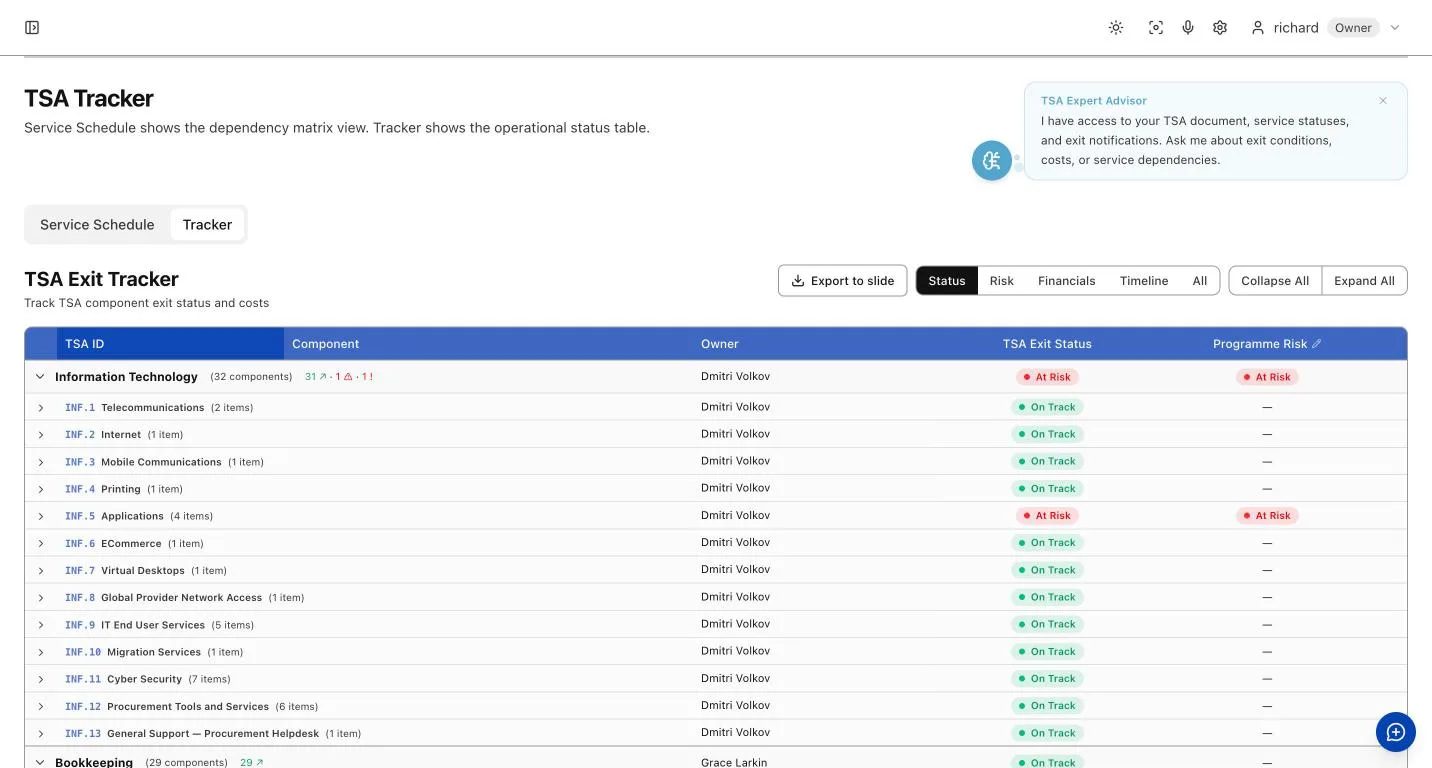
Illustrative - AtlanticM&A with sample data.
One clock per service, and the date that matters
Each row carries the service, its workstream, the exit date, the owner, the status and the programme risk. Status and risk are separate columns on purpose: a service can be on track and still be the riskiest thing in the programme. Exit status reads On Track, At Risk or Exited, and nobody sets Exited by hand: a service has exited when its exit notice has been sent and the notice period has run its course. Finished work is not the same as a service that has been switched off.
The date you have to act on is not the exit date. It is the exit date, less the transition period, less the contractual notice period. The tracker does that subtraction for every service and shows how many days are left before notice must be served. Enter a shorter notice period than the addendum specifies and you are warned, not blocked. That is a commercial call, not a system rule. The help article on using the TSA Tracker has the detail.
Virtual Walk the Walls: see what is waiting on what
Virtual Walk the Walls is the Dependencies view of the work plan. Pick a workstream and you see which teams it depends on, and which depend on it, so you are not discovering on Day 90 that the ERP exit is holding up the payroll exit. It lays the work out by workstream (IT, HR, Finance and so on) and counts only the dependencies that cross between them, which are the ones that matter for sequencing.
The tracker counts down the days left before notice must be served on every service, so the ones running short are visible early. The view does not score the TSA or recommend exit timing. The sequencing decision stays with you.
Where it sits in the programme
The page lays out five stages: scoping before signing, addendum drafting from signing to Day 1, activation on Day 1, the exit programme, and a clean handover as each service leaves TSA scope. AI drafting of the addendum itself, from your operational map, is badged Coming soon. Counsel still papers the legal TSA.
Each exit notification carries an approval workflow, an AI-assisted draft built from the service record and the addendum's terms, a legal review step, and a record of delivery to the seller's TSA lead. You sign it.
The steerco view comes out of the same records. TSA exit status is a Report Centre configuration, so the pack composes from live tracker data: services by status, exits against plan, services at risk, notice dates coming up. Snapshots hold the position as at a date, because disputes about what was in scope are settled by what the record said at the time.
A seller holds a second set of numbers, and the TSA Executive Dashboard carries them in a Value Recovery table: the saving that keeps paying each year after the TSA closes, and the one-time gain. They are in different units, so there is no total until you enter a multiple to capitalise the ongoing saving, with its derivation shown beside it. The platform does not pick the multiple for you.
TSA Tracker is included on every plan from Independent up; the pricing page has the detail. For the wider carve-out, see the divestiture page.
About AtlanticM&A
AtlanticM&A is the Agentic Transformation OS. Its agents work inside the programme, both augmenting and automating the work of the transformation team: work plans, governance, stakeholders and reporting in one place, with a live value bridge that moves as the work does. It is a system of work rather than only being a system of record: the charter is written in it and the plan is built in it. Meeting notes come back as proposed updates to the plan and the RAID log, the team decides what stands, and every change the AI makes carries an audit trail. The platform does the slide-building, status reporting and stakeholder briefings that usually keep a consulting pyramid busy, so a small senior team can run the programme more nimbly and for less.